Welcome to the ultimate guide on maintaining the beating heart of your gaming world – your PC. If you're a seasoned gaming enthusiast or just starting out on your odyssey through the digital realm, ensuring your rig is in top-notch shape is non-negotiable. As a dedicated PC gamer, you understand the importance of finely-tuned hardware, and we're here to equip you with the knowledge and practices that will not only enhance your gaming experience but also prolong the life of your beloved machine.
In a world where cutting-edge graphics and high-performance computing is crucial to maintaining an edge in the gaming universe, looking after your PC is an essential part of your routine. We'll delve into the intricacies of dusting the insides, performing regular software check-ups, troubleshooting common issues, and even extending the lifespan of your equipment. Let's start shielding your digital fortress from the perils of decay to ensure none of your gaming marathons are cut short.
Why Proper Care and Maintenance Are Critical
Before we unpack the specifics, it's imperative to understand why maintaining your gaming PC is a mission critical aspect of being an adept player.
The Performance Paradigm
Your PC is a labyrinth of interconnected hardware and software that, when not maintained, can degrade in performance over time. Regular cleaning and maintenance help to ensure every electronic handshake happens at lightning speed without any hitches.
The Lifespan Story
We're all familiar with the wear and tear our most beloved items endure. Your PC's components are no different. By following proper care and maintenance procedures, you can significantly extend the lifespan of your hardware, saving you from the financial blow of a complete overhaul or an untimely replacement.
The Security Line
A well-maintained PC is less likely to suffer from the maladies that can cripple a poorly kept one. Regular checks and upkeep not only improve performance but also fortify your machine against security vulnerabilities and glitches that could leave you vulnerable or unable to game.
Now that you understand the 'why', let's delve into the 'how'.
Keeping It Clean
Dust is the silent enemy of gamers everywhere. It's the clog in the wheel, the grit in the ointment, and the nemesis of your PC's cooling systems. But with a few proactive measures, you can win this war.
Regular Dusting and Cleaning
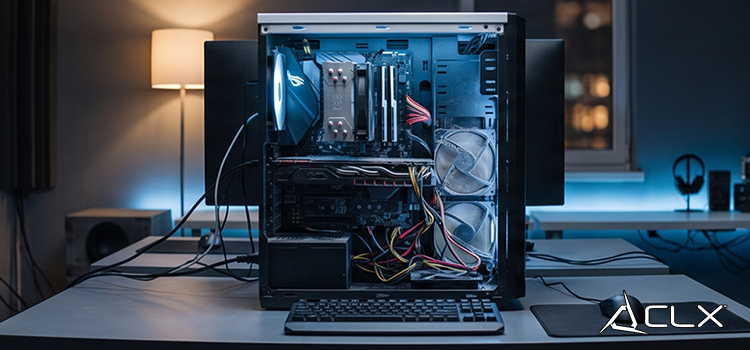
Make a schedule. Dust accumulates faster than you think, and when it settles on your components, it insidiously hampers airflow and can lead to overheating. Use compressed air to gently blast away the dust from your CPU and GPU fans, power supply, and other crevices where dust might hide.
Cleaning the Keyboard and Mouse
Aside from giving you a severe case of cringe-worthy aesthetics, a dirty keyboard and mouse can impact your gameplay and even harbor bacteria. With a can of compressed air, purge the keys and intricate sections, and use a microfiber cloth to keep everything else sparkling.
Proper Cable Management
Clutter isn't just unsightly; it can restrict airflow and make maintaining your PC more challenging. Use cable ties and neat routing to keep your wires organized and out of the way.
Maintenance Tasks
With cleaning covered, let's move to the essential software side of things. Your PC needs regular updates and tuning, much like the latest MMORPG patch.
Updating Drivers and Software
Keeping your graphics drivers, operating system, and gaming software updated is paramount. New updates often carry performance enhancements and security fixes, two things gamers can't do without.
Monitoring temperatures and performance
Utilize software that monitors your temperatures and performance stats so you can catch issues early. High temperatures or sudden drops in performance can be the canary in the coal mine for serious hardware problems.
Regular Backups and System Optimization
A smart gamer is a prepared gamer. Regular backups are your life insurance against data loss. Furthermore, optimization tools can help declutter your system, streamline your games, and keep your SSDs and HDDs running smoothly.
Troubleshooting Common Issues
Equipment failure can feel like a critical game over. However, most common issues have relatively straightforward solutions.
Overheating
If your PC is running hot, ensure your fans are free of dust and your thermal paste is replaced regularly. Advanced users can also consider aftermarket cooling solutions for their CPU and GPU.
Slow Performance
Slow boots, in-game stutters, and delayed response times could be your storage devices. Consider upgrading to an SSD if you haven't already or replacing an aging one with a fresh speedster.
Blue Screen of Death (BSOD)
A BSOD can be triggered by various issues from bad RAM to rogue software. Run memory diagnostics, and ensure you're not pushing your overclocks too far.
Extending Lifespan
Your PC's lifespan is in your hands. By following the right practices, you can ensure it's with you for the long haul.
Upgrading Components
As new games push the limits of graphic fidelity, sometimes you have to bite the bullet and upgrade. A new GPU or more RAM can revitalize your system.
Proper Power Management
Use surge protectors to guard against electrical damage, and consider a UPS if power outages are common in your area. Quality power ensures quality performance.
Protecting Against Power Surges
In the event of a power surge that your surge protector can't handle, a UPS (Uninterruptible Power Supply) could save your system from becoming a paperweight. It also provides you with enough emergency power to finish and safely shut down your system in the event of a power failure.
Conclusion
Your gaming PC is more than just technology; it's an investment in your digital identity. By incorporating these best practices into your routine, you're not just caring for a piece of hardware, you're safeguarding the adventures, battles, and triumphs that define you as a gamer. So embrace the dusting, update vigilance, and optimization rituals – they are the unsung heroes of your gaming parade. And should you ever find yourself in the midst of troubleshooting, don't fret. With the right knowledge and a steady hand, you'll be back in the action, with a PC that's singing sweetly like the spoiled hero machine it is.
Your desk is your battlefield, and your PC is your greatest ally. It's time to defend it with the same zeal and strategy you apply to your gameplay. Start integrating these practices today and witness the transformation in your gaming experience. Remember, in the ever-changing landscape of digital quests, your PC is one constant you can keep by your side for many, many levels. Treat it well, and it will return the favor with countless hours of flawless performance and unforgettable moments in the worlds of your dreams. Your gaming PC is not just a machine – it's an extension of your gaming soul. Nurture it with care, and it will lead you to victories beyond measure.
As you prepare to give your PC that well-deserved TLC, remember that the most formidable of warriors inspect their steeds before charging into battle. Your PC carries you through the virtual fray, it's time to show it the love it needs to be your true gaming workhorse.