Introduction to Ray Tracing
Gaming has come a long way since the days of pixelated characters and simple backgrounds. Today, we are on the cusp of one of the most revolutionary advancements in gaming technology—ray tracing. Though this concept isn't entirely new, its application in modern gaming is breaking boundaries and setting new standards for visual realism.
In this blog post, we’ll explore what ray tracing is, how it works, and why it's such a game-changer for gamers. We'll also discuss which hardware and software support it, provide a practical guide for enabling and optimizing it on your system, and look at what the future holds for this groundbreaking technology.
Understanding the Technology
Ray tracing is a rendering technique that simulates the way light interacts with objects in a virtual environment. Unlike traditional rasterization methods, which approximate how light works, ray tracing calculates the actual paths that light rays take to create more realistic images.
The technology works by tracing the path of light rays from the eye of the viewer (or the camera) back to the light source. This method accounts for effects like shadows, reflections, and refractions in a much more accurate manner. The result is stunningly realistic lighting and textures that immerse you deeper into the game world.
Ray tracing is computationally intensive, requiring powerful hardware to run efficiently. It makes use of complex algorithms to simulate each ray of light and its interactions, which can be taxing on both the GPU and CPU. However, when executed properly, the visual payoff is unparalleled.
The Impact on Gaming
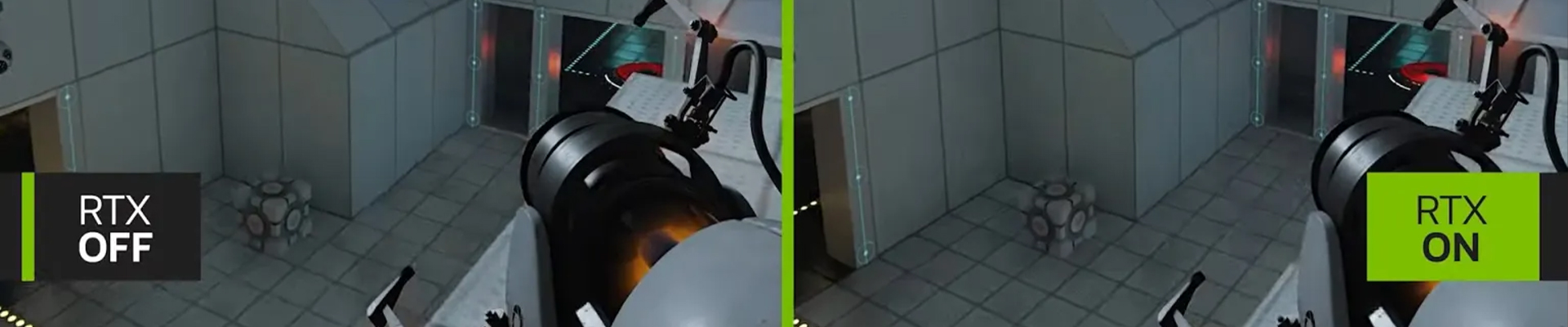
One of the most noticeable impacts of ray tracing in gaming is the leap in visual fidelity. Games utilizing ray tracing technology boast incredibly realistic lighting, shadows, and reflections. This creates an immersive experience that makes you feel as though you're stepping into a lifelike world.
Take reflections, for example. Traditional methods often render them inaccurately or not at all, breaking the immersion. With ray tracing, reflections are generated in real-time, accurately reflecting the environment and making water surfaces, glass, and mirrors appear lifelike.
Shadows are another area where ray tracing excels. It generates soft, natural-looking shadows that have varying intensities based on the light source. This heightened realism contributes to a more engaging and visually appealing gaming experience.
Hardware and Software Support
For gamers looking to experience ray tracing, having the right hardware is essential. NVIDIA's RTX series graphics cards were among the first to bring ray tracing to the masses. AMD has also stepped into the fray with its RX 6000 series, offering robust ray tracing capabilities.
On the software side, many game engines now support ray tracing, including Unreal Engine and Unity. Popular games like Cyberpunk 2077, Control, and Battlefield V already offer ray tracing features, further driving the adoption of this technology.
Additionally, consoles like the PlayStation 5 and Xbox Series X have also started incorporating ray tracing, allowing even more gamers to enjoy its benefits without needing a high-end PC setup.
Future of Ray Tracing
The future of ray tracing looks incredibly promising. As technology advances, we can expect even more realistic and detailed graphics in upcoming games. One area of development is hybrid rendering, which combines rasterization and ray tracing to achieve optimal performance and visual quality.
Another exciting prospect is real-time global illumination, which aims to make every light source in a game world dynamic and interactive. This would allow for more realistic environments where lighting conditions change based on in-game events or time of day.
Machine learning is also expected to play a significant role in the evolution of ray tracing. Techniques like NVIDIA's DLSS (Deep Learning Super Sampling) already use AI to upscale lower resolution images, providing high-quality visuals with less computational load.
Practical Guide for Gamers
Ready to jump into the world of ray tracing? Here’s how you can get started:
Step 1: Check Your Hardware
Ensure your system meets the minimum requirements for ray tracing. An NVIDIA RTX or AMD RX series GPU is recommended. Make sure your CPU and RAM are also up to par.
Step 2: Update Drivers
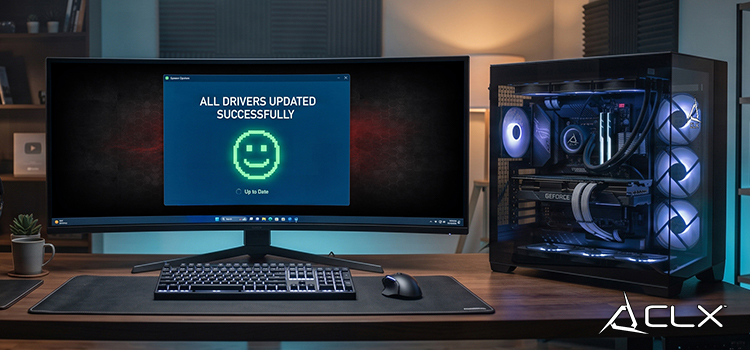
Keep your GPU drivers updated to the latest version. This ensures you have the most recent enhancements and fixes for ray tracing.
Step 3: Configure In-Game Settings
Most games that support ray tracing will have an option to enable it in the settings menu. Look for options like 'Ray Tracing,' 'RTX,' or 'DirectX Raytracing (DXR)' and toggle them on.
Step 4: Optimize Performance
Ray tracing can be demanding, so you might need to adjust other graphical settings to maintain a smooth frame rate. Lower settings like shadows, textures, or resolution if needed.
Step 5: Enjoy the Game
Once everything is set up, immerse yourself in the visually stunning world that ray tracing brings to life!
Conclusion
Ray tracing is more than just a buzzword; it's a technological advancement that has the potential to redefine the gaming experience. From ultra-realistic lighting and shadows to reflections that mirror reality, the benefits are undeniable.
As hardware and software continue to evolve, the accessibility and implementation of ray tracing will only get better. Whether you're a casual gamer or a hardcore enthusiast, exploring ray tracing can elevate your gaming experience to new heights.
About Us
CLXGaming is a PC builder based in Wichita, KS that builds prebuilt PCs, custom PCs and laptops for all of your gaming and creative needs. We work with any budget and offer flexible gaming PC financing.
If you would like more information about our PCs, please contact our customer support team at (855) 490-2569 or [email protected]. We pride ourselves on our excellent customer service and are happy to assist with your needs.