Introduction to the Importance of Cooling Systems in Gaming PCs
Gamers know that a reliable cooling system is crucial for a high-performing gaming PC. Whether you’re battling leagues in an MMORPG or pushing the limits in a shooter, your computer must stay cool to perform at its best. Overheating can lead to lag, crashes, and even permanent damage to your hardware.
This blog will explore two primary cooling methods—liquid cooling and air cooling. We'll break down their pros and cons, compare them in various aspects, and help you decide which is better for your gaming setup. By the end, you’ll have a clear understanding of how to keep your PC cool and your gaming experience seamless.
Exploring Liquid Cooling Efficiency Cost and Installation
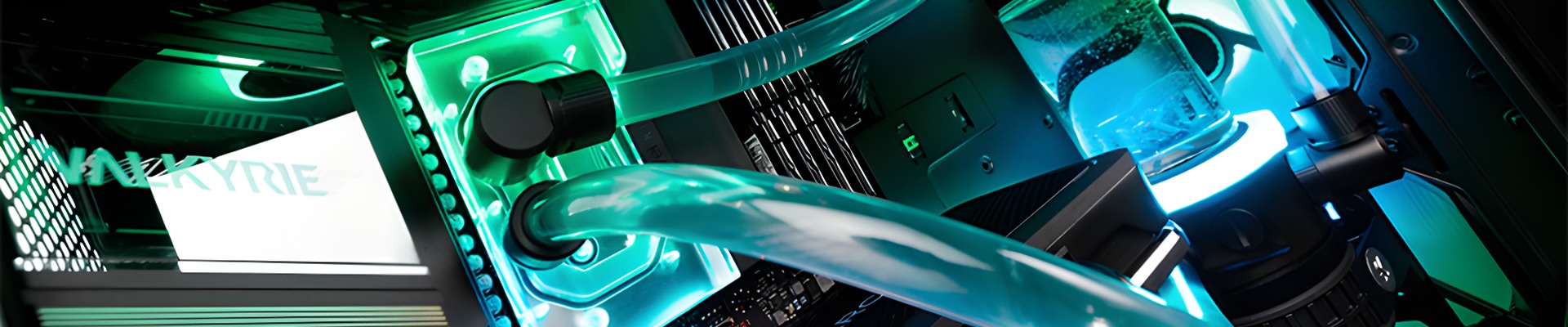
Liquid cooling is often hailed as the premium choice for PC cooling. It uses a liquid coolant to absorb heat from your CPU and GPU, transferring it to a radiator where it dissipates.
Efficiency
Liquid cooling systems are highly efficient. Because water transfers heat more effectively than air, these systems can keep your components cooler, even under heavy loads. This efficiency translates to better performance, as your hardware can run at optimal speeds without throttling.
Cost
On the downside, liquid cooling systems are generally more expensive. They involve not only the cost of the liquid cooling unit itself but also additional components like pumps, tubing, and radiators. For budget-conscious gamers, this can be a significant drawback.
Installation
Installing a liquid cooling system can be tricky. It requires careful handling and a certain level of technical know-how. Unlike air coolers, which can be attached relatively easily, liquid coolers need proper fitting to avoid leaks that could damage your components. However, many gamers find the effort worth it for the superior cooling performance these systems offer.
Examining Air Cooling Performance Noise and Maintenance
Air cooling remains the most common method to keep gaming PCs cool. It relies on fans to push air over heatsinks attached to your CPU and GPU, dissipating heat through airflow.
Performance
Air coolers are highly effective at managing temperatures, particularly in standard gaming setups. While they may not offer the same cooling efficiency as liquid systems, high-quality air coolers can still maintain safe temperatures, even during intense gaming sessions.
Noise
One downside of air cooling is noise. Fans can become quite loud, especially under heavy load, which might be distracting if you’re aiming for an immersive gaming experience. However, modern air coolers have made significant strides in reducing noise levels, featuring quieter fans and improved designs.
Maintenance
Air coolers score points for being low maintenance. Unlike liquid cooling systems, there's no need to worry about coolant levels or potential leaks. Dust can accumulate on the heatsinks and fans, but regular cleaning will keep your system running smoothly.
Comparison of Liquid and Air Cooling Systems
It's time to pit these two cooling titans against each other. Understanding how they compare in key areas can help you make an informed decision.
Cooling Efficiency
In terms of raw cooling power, liquid cooling generally takes the lead. It’s more effective at transferring heat away from your components, which can be critical for high-performance gaming PCs, especially those that are overclocked.
Cost Considerations
Air cooling wins in the cost department. High-quality air coolers are usually less expensive than liquid cooling systems and provide excellent performance for their price. If you’re on a budget, air cooling might be the more practical choice.
Installation Ease
Air cooling is easier to install and maintain. Liquid cooling systems require more effort and expertise to set up, and the risk of leaks adds a layer of complexity. If you’re not comfortable with a more hands-on approach, air cooling is the safer bet.
Noise Levels
Liquid cooling systems tend to run quieter than air coolers, as they rely less on fans. If a silent gaming environment is a priority, liquid cooling might be worth considering despite the higher cost and installation complexity.
Factors Influencing the Choice Overclocking Budget and Room Conditions
Deciding between liquid and air cooling involves considering several factors unique to your gaming setup.
Overclocking Needs
If you plan to overclock your CPU or GPU, liquid cooling is often the better option. Overclocked components generate more heat, and liquid cooling systems are more adept at managing these higher temperatures, ensuring stable performance.
Budget Constraints
Your budget plays a significant role in your decision. Liquid cooling systems are generally more expensive, so if you’re working with a limited budget, a high-quality air cooler might provide the best balance of performance and cost.
Room Conditions
The environment where your PC operates also matters. Liquid cooling systems can be more efficient in warmer rooms, as they aren’t as affected by ambient air temperature. Conversely, air coolers might struggle in hot conditions, leading to increased fan noise and reduced cooling efficiency.
Conclusion
Choosing between liquid and air cooling systems depends on your specific needs and preferences. Liquid cooling offers superior cooling performance and quieter operation but comes at a higher cost and with more complex installation. Air cooling is more affordable, easier to install and maintain, but might not offer the same level of cooling efficiency, especially for overclocked systems.
Understanding your gaming PC's cooling needs is crucial for maintaining optimal performance and preventing damage. Whether you opt for liquid or air cooling, investing in a reliable cooling solution will enhance your gaming experience and extend the life of your hardware.
Ready to level up your PC cooling game? Explore our comprehensive guides and product recommendations to find the perfect cooling solution for your rig. Happy gaming!
About Us
CLXGaming is a PC builder based in Wichita, KS that builds prebuilt PCs, custom PCs and laptops for all of your gaming and creative needs. We work with any budget and offer flexible gaming PC financing.
If you would like more information about our PCs, please contact our customer support team at (855) 490-2569 or [email protected]. We pride ourselves on our excellent customer service and are happy to assist with your needs.